


It’s the $1,000 question: Should you buy your own router or rent it from your internet service provider?
Most ISPs charge between $10 and $15 monthly for equipment, while you can generally get a modem and router for less than $200. Purchasing your own internet equipment usually pays for itself in the first year, but it often comes with some additional headaches.
I’ve been writing about the internet for six years, and I’ve carried around a shameful secret for all six of them: I’ve been renting my router from Xfinity the whole time. I know — this is like a painter renting their brushes every month. But my rented equipment has worked fine, even as I’ve known that I’ve been paying a premium for the convenience of an ISP-provided setup.
All this time, I’ve been paying $10 to $15 extra for the privilege of using Xfinity’s modem and router gateway device. (Xfinity seems to increase the price of equipment a dollar or two every year.) That’s mostly been fine with me — my internet bill is reasonable, and I’ve been OK with paying a little extra for the convenience. But after combing through my old bills, I arrived at a number that prompted me to reconsider: $873. That’s how much I’ve spent on Xfinity’s equipment fees over the years.
With the money I’ve spent renting Xfinity equipment, I could’ve bought the most advanced router CNET’s ever tested and then bought another one as a backup. I could’ve doubled the internet speed I was getting. I could’ve booked a flight to Oslo.
As satisfied as I’ve been with my service, owning your own equipment is almost always the better option. You’ll often get better performance — my upload speeds increased by more than 2,000% — and it’ll usually pay for itself within the first year or two.
You might be perfectly content to pay a bit extra for the convenience of not having to buy and set up your own equipment. But if you’re looking to save money in the long run, and are comfortable purchasing and managing your own gear, it’s a far better deal to shell out for your own router and modem.
Here’s what I’ve learned about making the switch from rented equipment to my own, and here’s how you can make a similar change as painless as possible.
How to choose the right modem and router
The best internet is the internet you never notice, and I can’t remember the last time my connection went out or I saw a buffering wheel in my home. And this is all with a device from 2017 that Xfinity describes as an “old Wireless Gateway with limited speeds and functionality.”
This goes to show how much the type of internet user you are has to do with what kind of equipment you need. I live in a 750-square-foot apartment, and my internet needs are mostly limited to video calls and TV streaming. If you live in a larger home with multiple floors, the same router likely won’t cut it. Similarly, activities like online gaming hinge on split-second reactions. If this instantaneous responsiveness is important to you, it’s probably worth investing in a gaming router that minimizes lag.
Wi-Fi routers run the gamut from entry-level models like the TP-Link AC1200 for $30 to ultra-advanced mesh systems like the Netgear Orbi 970 Series for over $1,700. To test each Wi-Fi router, CNET runs three speed tests in five different rooms in our testing facility, logging results for download speed, upload speed and latency. That process is repeated six times, accounting for variations in network performance at different times of the day.
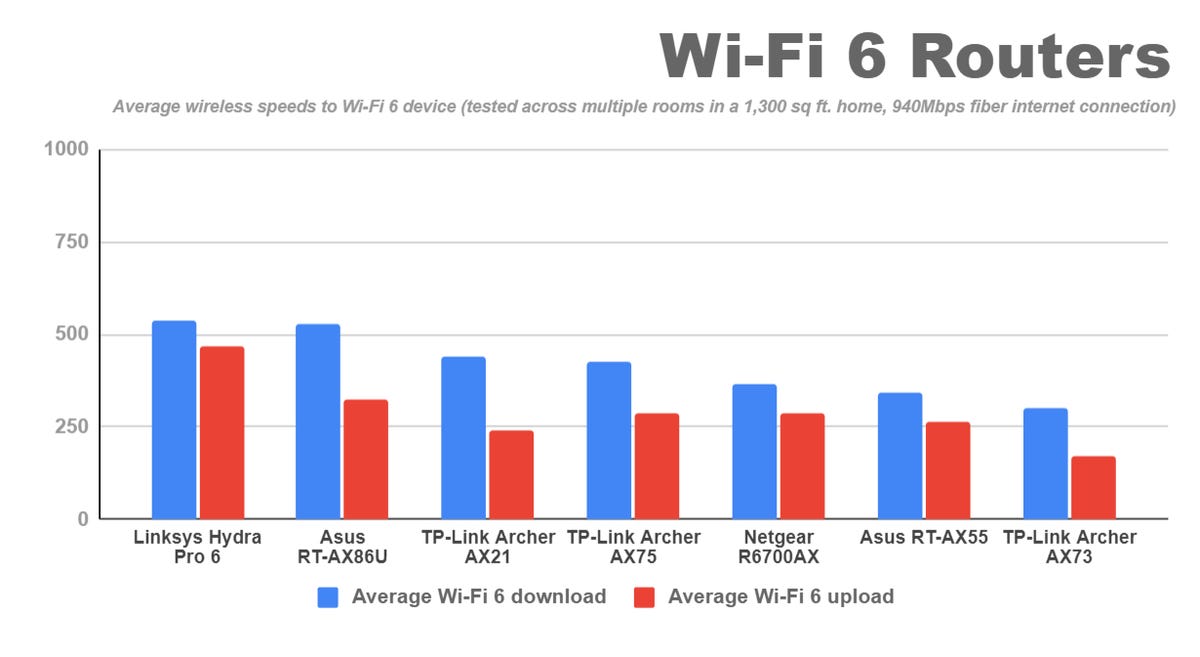
After consulting our picks for the best wireless routers, I decided to go with our budget pick: the TP-Link Archer AX21, of which my colleague and router connoisseur Ry Crist wrote, “It’s nothing fancy, but it offered near flawless performance for small- to medium-size homes in our tests, and it’s a cinch to setup.” I get only 200Mbps through my Xfinity plan, so the 700Mbps the TP-Link hits at close range is more than enough juice and only costs $75.
Do you need to buy a modem?
Depending on what type of internet you have, you may need to purchase a cable modem in addition to your router. Some ISPs, like Spectrum, include the modem for free but charge extra for a router.
The main thing to look for in a modem is compatibility. Your internet provider will have a page on their website that lists all the models that it works with, and you shouldn’t stray from this. You may also have a choice between DOCSIS 3.0 and 3.1; the newer standard provides faster speeds, but DOCSIS 3.1 modems are typically more expensive. Other things to consider are the modem’s speed limits — make sure they’re equal to or above your internet plan — and the number of Ethernet ports.
Xfinity doesn’t provide a free modem, so I had to buy one in addition to a Wi-Fi router. I opted for the Hitron CODA Modem — a DOCSIS 3.1 model that’s one of the cheapest Xfinity-compatible models I could find for $100. It supports download speeds up to only 867Mbps, but that’s still far more than my Xfinity plan.
How to set up your new modem and router
Ordering the equipment is the easy part; the ordeal of setting up third-party equipment is what keeps many customers on the hook for years. The process is largely the same whether you’re starting service fresh with a new provider or swapping out old equipment. Here’s everything you’ll need to do.
1. Activate your new modem with your ISP
The modem is the piece of equipment that brings the internet to your home through a coaxial cable connected to your internet provider’s network. Before it can work, ISPs need to tie your specific modem to your account. If you’re replacing old equipment, they will also turn this off as they activate the new modem. ISPs do this by logging your MAC (media access control) number, which can be found on the bottom of the modem.
You can typically do this through your internet provider’s app, in a live chat or by calling a customer service number.
2. Connect the coax cable to your modem
After your new modem’s MAC address is registered with your ISP, you’ll be prompted to connect your modem to the cable outlet in your wall and plug it into a power outlet. You may have to wait up to 5 minutes, and your modem’s lights will tell you when it’s receiving the internet signal. Once the indicator lights are on, you’re ready to set up your wireless router.
3. Set up your Wi-Fi router
Each Wi-Fi router has its own setup process, so you’ll want to follow the instructions provided. In the case of the TP-Link Archer AX21, that meant unplugging the power to the modem, connecting the modem to the router’s WAN port via an Ethernet cable, powering on the modem and then plugging the router into a power outlet. From there, I set up my new network through the TP-Link app.
That’s the short version. There’s a lot more to consider when setting up a wireless router, including choosing the optimal location, setting up parental controls and protecting your privacy. For my purposes, though, I was ready to start testing out my new internet connection.
Speed comparison: Which setup is fastest?
I wanted to see how my new modem and router would compare with my old equipment, so I ran speed tests before and after I was connected: one from my desk next to the router and one from the furthest corner of my apartment (regrettably, the bathroom).
My old modem and router returned 164/5Mbps speeds from my desk and 143/5Mbps from the bathroom — not bad for an internet plan that advertises 200/10Mbps speeds. But the speeds with my new equipment were eye-popping: 237/118Mbps at both my desk and my bathroom. I didn’t just save money by purchasing my own equipment — I’m actually getting a significant speed boost too.
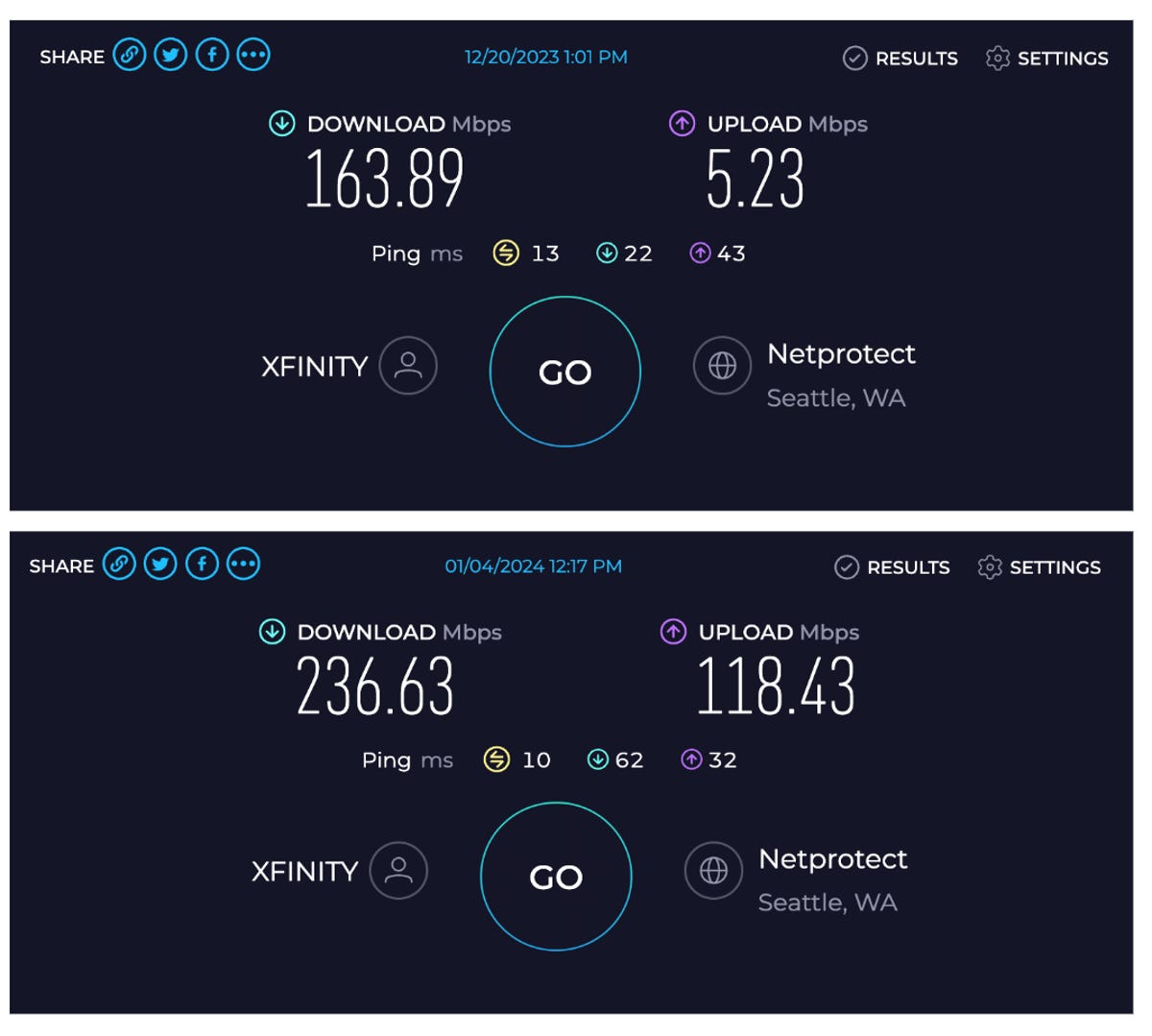
I have no idea why my new equipment picked up 10 times the upload speeds of my old one. I subscribe to Xfinity’s Connect More plan, which is supposed to get only 10Mbps upload speeds. In 2022, Xfinity announced that it was increasing upload speeds on my plan to 100Mbps — but only for customers who pay for its $25-per-month xFi Complete equipment. Apparently, I’m reaping those same benefits with my new modem and router. My best guess is that the upgrade from a DOCSIS 3.0 to a 3.1 modem is the main reason for the jump in upload speeds.
How to save yourself some headaches
I eventually got my modem and router set up properly, but I made plenty of mistakes along the way. Here’s what I would do differently:
- Buy your modem and router on day one. Moving is a pain, and no one wants to make their to-do list even longer, but this is one task where the extra effort pays off (nearly a thousand dollars in my case). A technician may have to come out to your house to set up your internet no matter what, so it makes sense to have your modem and router ready to go in case there are any issues.
- Use your internet service provider’s list of compatible modems. Routers aren’t tied to specific providers, but if you have to purchase your own modem, you’ll need to make sure that it works with your ISP. Don’t cut corners here. I searched Amazon for a modem that said it was compatible with Xfinity and ended up having to return it a week — and several hours of phone calls — later. Your provider should have a page where it lists all the modems that it works with — don’t stray from this.
- Pay for only the speed you need. Internet equipment is expensive, and there’s no reason to pay for a modem certified for 2,000Mbps when you’re getting only 200Mbps with your plan. The same goes for routers — you don’t need to pay top dollar for a gaming router with exceptional latency if you’re just streaming TV and scrolling the internet.
The bottom line
It’s no fun to set up a new modem and router, but is it worth it? Absolutely. Not only are my internet speeds dramatically improved, but I’m paying significantly less for them. I’m saving $15 per month on equipment, and somewhere along the line, an Xfinity agent bumped my plan price down for the next year. My monthly bill is going from $78.54 to $50. That’s far more than I expected to save, and my new equipment will pay itself off within the first six months. My only regret is that I didn’t make the leap sooner.